




Oh My Posh
https://github.com/JanDeDobbeleer/oh-my-posh
使用 Winget 安裝
winget install JanDeDobbeleer.OhMyPosh -s winget安裝 Nerd Font 字體
Nerd Font 字體(NF 字體),可以顯示 Oh My Posh 的圖示 (Icons)和特殊符號 (Glyphs)。
我使用的是 maple mono NF CN
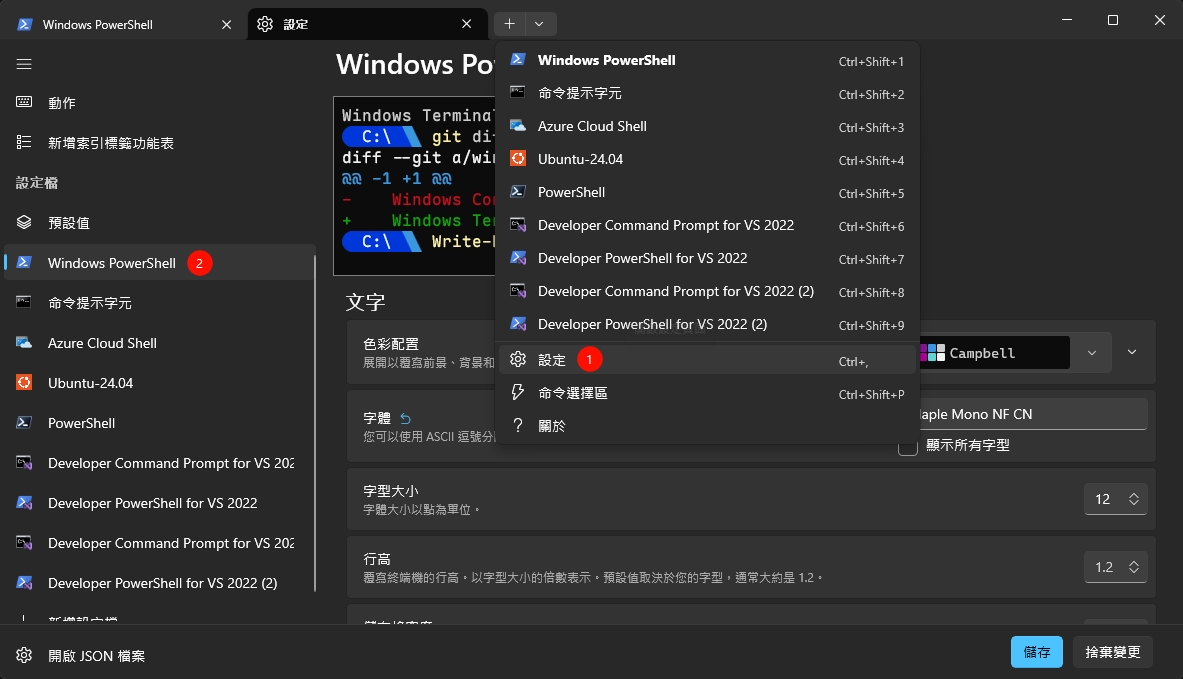
- 設定 powershell 字體:
設定檔 > powershell 或是你用的 > 外觀 > 字體
修改 PowerShell 配置文件
- 確認配置文件路徑:
echo $PROFILE創建配置文件(如果不存在):
if (!(Test-Path -Path $PROFILE)) {
      New-Item -Type File -Path $PROFILE -Force
}- 編輯配置文件:
code $PROFILE添加以下內容:
oh-my-posh init pwsh --config "$env:POSH_THEMES_PATH\jandedobbeleer.omp.json" | Invoke-Expression$env:POSH_THEMES_PATH是預設的主題存放路徑。jandedobbeleer.omp.json是預設主題,你可以根據喜好更換。
預覽主題: https://ohmyposh.dev/docs/themes
更改主題: 編輯 $PROFILE 文件,將 --config 的主題路徑修改為你選擇的主題,重啟後生效。
自訂主題: https://ohmyposh.dev/docs/installation/customize
{
  "$schema": "https://raw.githubusercontent.com/JanDeDobbeleer/oh-my-posh/main/themes/schema.json",
  "blocks": [
    {
      "alignment": "left",
      "segments": [
        {
          "background": "#c06b9a",
          "foreground": "#ffe8f4",
          "leading_diamond": "\ue0b6",
          "style": "diamond",
          "template": " \uf004 {{ .UserName }} ",
          "type": "session"
        },
        {
          "background": "#e2799c",
          "foreground": "#fff0f7",
          "powerline_symbol": "\ue0b0",
          "properties": {
            "style": "full"
          },
          "style": "powerline",
          "template": " \ue5ff {{ .Path }} ",
          "type": "path"
        },
        {
          "background": "#f3a0b5",
          "foreground": "#4a1528",
          "powerline_symbol": "\ue0b0",
          "properties": {
            "branch_icon": "\ue725 ",
            "fetch_status": true,
            "fetch_upstream_icon": true
          },
          "style": "powerline",
          "template": " {{ .UpstreamIcon }}{{ .HEAD }}{{ if .Working.Changed }} \uf004{{ .Working.Changed }}{{ end }}{{ if gt .StashCount 0 }} \ueb4b{{ .StashCount }}{{ end }} ",
          "type": "git"
        },
        {
          "background": "#ddb8e0",
          "foreground": "#3a1a4a",
          "powerline_symbol": "\ue0b0",
          "properties": {
            "display_mode": "files"
          },
          "style": "powerline",
          "template": " \ue718 {{ if .PackageManagerIcon }}{{ .PackageManagerIcon }} {{ end }}{{ .Full }} ",
          "type": "node"
        },
        {
          "background": "#f9c4d4",
          "foreground": "#72243e",
          "properties": {
            "time_format": "15:04"
          },
          "style": "diamond",
          "template": " \uf004 {{ .CurrentDate | date .Format }} \uf004 ",
          "trailing_diamond": "\ue0b4",
          "type": "time"
        }
      ],
      "type": "prompt"
    },
    {
      "alignment": "right",
      "segments": [
        {
          "background": "#3a1a2e",
          "foreground": "#d4a0c0",
          "leading_diamond": "\ue0b2",
          "style": "diamond",
          "template": " \ue7ad {{.Profile}}{{if .Region}}@{{.Region}}{{end}} ",
          "trailing_diamond": "\ue0b4",
          "type": "aws"
        }
      ],
      "type": "rprompt"
    },
    {
      "alignment": "left",
      "newline": true,
      "segments": [
        {
          "foreground": "#f3a0b5",
          "style": "plain",
          "template": "\uf004 ",
          "type": "text"
        }
      ],
      "type": "prompt"
    }
  ],
  "final_space": true,
  "version": 3
}
TranslucentTB
調整 windows 工作列樣式
https://translucenttb.github.io/tips
Download: https://github.com/TranslucentTB/TranslucentTB/releases
Windhawk
- Taskbar Clock Customization
可以定義工作列的 windows 時間樣式